Friday, October 21, 2022

12 Best Calculator Plugins for Your WordPress Site

Are you looking for a calculator plugin for your WordPress website?

There are many types of WordPress plugins to calculate prices, measurements, dates, form fields, and more.

In this article, we have hand-picked some of the best calculator plugins for your WordPress site.

Best Calculator Plugins for WordPress Site

What to Look For in a WordPress Calculator Plugin

There are a lot of different calculator plugins out there that you could use on your WordPress site.

Some calculator plugins can be used to create any calculator of your choice. However, this can be a lot of work. When possible, you want to pick a plugin with a pre-built calculator template for the type of calculator you want to create.

Choosing a responsive calculator that looks good on mobiles and computers is also important. You may also want a plugin that lets you change the colors and styles of your calculator so it can match your website’s color scheme and brand.

1. Formidable Forms Calculators

Formidable Forms Calculator

Formidable Forms is a drag and drop form builder with a large range of pre-built calculator templates. These let you easily create different calculators on your WordPress blog or website.

With Formidable Forms calculator templates, you can create and add the following calculators on your site:

  • BMI Calculator
  • Percentage Calculator Template
  • Advanced Mortgage Calculator Template
  • Simple Mortgage Calculator Template
  • WooCommerce Product Configurator
  • Car Payment Calculator Template
  • Debt to Income Ratio Calculator Form Template
  • Life Insurance Calculator Template
  • ROI Calculator Form Template
  • Savings and Investment Calculator Form Template
  • Order/Billing Form Template
  • Age Calculator Form Template
  • Compound Interest Calculator Template
  • Final Grade Calculator Template
  • Pregnancy Due Date Calculator Form Template
  • Daily Calorie Intake Calculator Template
  • Length Conversion Calculator Form Template
  • Paycheck Calculator Form Template
  • Tip Calculator Form Template
  • Amortization Calculator Template

Some of these are simple, useful tools, like the percentage calculator, the length conversion calculator, the tip calculator, and the age calculator. Others are much more detailed and offer huge value to your users.

For instance, if you’re running a medical or health blog, you might want to offer a BMI (Body Mass Index) calculator or a Daily Calorie Intake calculator. These are easy to create using Formidable Forms.

If you sell real estate, you could use the simple mortgage calculator or the advanced mortgage calculator on your site. You could even offer tools like the debt-to-income ratio calculator to help users determine whether the mortgage is affordable.

All Formidable Forms calculators are responsive and look great on mobile devices. You can also easily customize them to match your website’s branding.

Formidable Forms is our top calculator pick due to its large range of calculators and ease of use. It’s also one of the best WordPress contact form plugins.

2. Calculated Fields Form

Calculated Field Forms

Calculated Fields Form allows you to create forms and perform mathematical calculations among form fields. It comes with a form and logic builder, which you can use to add fields, assign values to those fields, and define mathematical operators to run.

Calculated Fields Form comes with five built-in sample calculators that you can use or modify:

  • Simple Calculator Operations
  • Calculation with Dates (bookings with check-in and check-out dates)
  • Ideal Weight Calculator
  • Pregnancy Calculator
  • Lease Calculator

You can easily use Calculated Fields Form with the WordPress content editor (block editor) and the old classic editor. It also works with popular page builder plugins.

3. Responsive Mortgage Calculator

Responsive Mortgage Calculator

Responsive Mortgage Calculator is an easy-to-use mortgage calculator for real estate websites. It comes with a sidebar widget and shortcode that you can use inside your WordPress posts, pages, and below your listings.

It also comes with light and dark color schemes. However, you can disable plugin styling and use your theme’s colors or add custom CSS to style the calculator.

4. Measurement Price Calculator
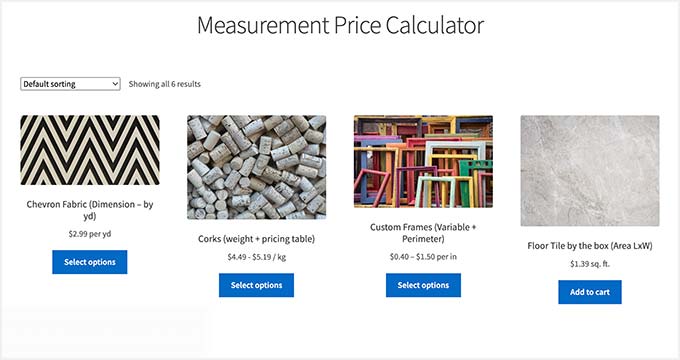
Measurement Price Calculator

Measurement Price Calculator is perfect for running a WooCommerce online store where you sell items of variable sizes. It allows you to add item pricing based on measurements selected by the customer.

It has two different measurement calculation methods, so you can choose whichever suits your product best. You can offer unit pricing based on set quantities (such as a box of tiles). Or you can let the user enter dimensions and buy the correct amount for the length, area, or volume they require.

It works well with other top WooCommerce plugins and addons.

5. WooCommerce Product Options and Price Calculation Formulas

WooCommerce Product Options

WooCommerce Product Options and Price Calculation Formulas provides additional WooCommerce product options and pricing calculation formulas. It comes with a custom product layout builder that allows you to add and display more product options for each item.

It includes conditional logic and formulas to calculate pricing based on selection. You can use it to show, hide, or change product pricing based on the customer’s selection. You can also use mathematical formulas to calculate product pricing and display options.

6. WooCommerce Price Based on Country

WooCommerce Price Based on Country

The WooCommerce Price Based on Country plugin does exactly what it says. The plugin uses WooCommerce’s geolocation feature to guess the customer’s location. It then displays pricing in the local currency.

It can automatically calculate pricing by the current exchange rate, or you can manually set it for each currency. It also includes a country switcher widget that enables users to change country and currency independently. This plugin works well with multilingual WordPress sites.

7. WordPress Mortgage Calculator Estatik

Estatik Mortgage Calculator

WordPress Mortgage Calculator Estatik is a useful real estate plugin to let your users estimate their mortgage payments.

It can be a simple calculator with the purchase price, down payment, and interest rate. Or, if you prefer, you can switch to advanced options like home insurance, property taxes, and PMI (private mortgage insurance).

The shortcode lets you add your mortgage calculator to your sidebar or to any post or page. You can display the results in a popup with a graph or with a simple image and text.

8. Mortgage Calculator

Mortgage Calculator

Mortgage Calculator is another useful mortgage calculator plugin. It shows a graph for the principal, interest, and remaining balance across the mortgage term. It can also handle property tax.

You can easily place the calculator in your website’s sidebar or on any post or page using the shortcode. It’s a free plugin, but note that it’s supported by ads.

9. YITH WooCommerce Cost of Goods
Yith Cost of Goods

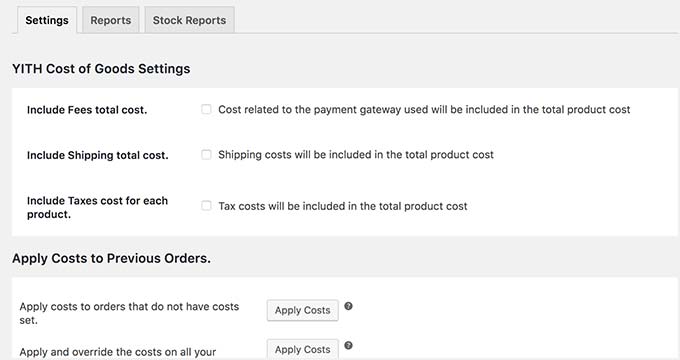
YITH WooCcommerce Cost of Goods is a handy plugin that helps you add the cost of goods and then calculate profit margins in your WooCommerce reports.

You can include the product cost, shipping, and payment processing costs for each product. The plugin will then calculate and show your profit margin in WooCommerce reports as a separate column.

This allows you to instantly calculate how your business is doing and what you can do to make more sales. For instance, you can offer more discounts for certain products or increase prices for products where you are not making any profit.

10. Loan Repayment Calculator and Application Form
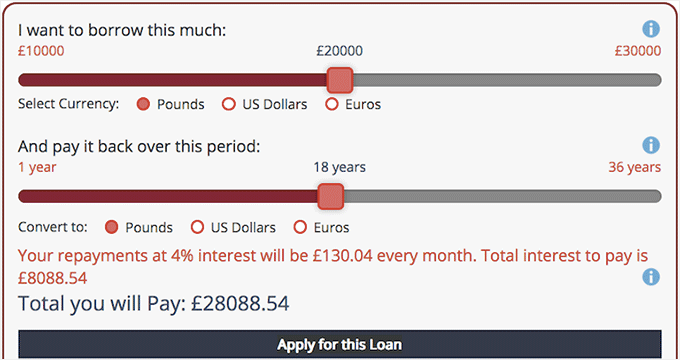
Loan Repayment Calculator

Loan Repayment Calculator and Application Form is a great calculator plugin for running a financial website or business. You can style it to match your site.

You can use it for fixed-fee payments, regular payments, savings, comparisons, and more. The calculator can handle different types of interest: fixed, simple, compound, and amortized.

The pro version also has sliders and the option for users to select their own currency.

11. CC BMI Calculator
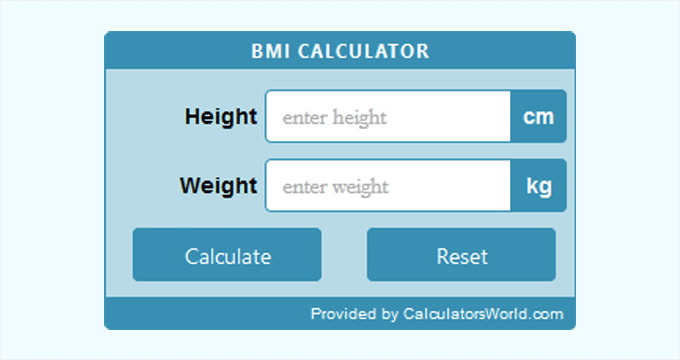
Bmi Calculator

CC BMI Calculator is a simple body mass index (BMI) calculator plugin used on health and fitness websites. It allows users to enter their height and weight information to see their body mass index score. This indicates whether their weight falls into a healthy range or not.

The plugin allows you to choose different styles by changing colors. However, using this feature requires you to add a link to the plugin author’s website. It is available in both imperial and metric systems, so you can choose which unit will be used as the default option.

12. Stylish Cost Calculator

Stylist Cost Calculator

Stylish Cost Calculator is a great way to provide customized, instant quotes for potential customers and clients. You can use one of the seven built-in templates to get started quickly.

The calculator can automatically convert between currencies, detecting the user’s location to show the right one. You can customize the cost calculator however you like, adding or removing options, changing colors, and more.

You can also set a bulk discount, create branded invoices, and more. If you have the Pro version, you can create coupons. You can also integrate the Pro version with PayPal to take payments.

We hope this article helped you discover the best calculator plugins for WordPress. You may also want to see our list of must have WordPress plugins for business websites and our comparison of the best email marketing services to grow your sales.

If you liked this article, then please subscribe to our YouTube Channel for WordPress video tutorials. You can also find us on Twitter and Facebook.

The post 12 Best Calculator Plugins for Your WordPress Site first appeared on WPBeginner.


October 21, 2022 at 10:55PM

60+ Internet Usage Statistics and Latest Trends for 2022

Are you curious about internet usage statistics?

When you learn how people around the world use the internet, it can help you understand what your business’s online presence should look like and how users will interact with your website.

In this article, we’ll share the latest internet usage statistics and trends that all business owners and marketers should know.

Internet Usage Statistics and Trends

Key Internet Statistics and Trends (2022)

We’ve split up these internet statistics into several different categories. You can use the table of contents below to jump to the internet stats you’re most interested in.

General Internet Usage Statistics

General Internet Usage Statistics
  • As of April 2022, there were five billion internet users worldwide, which is 63% of the global population. 
  • China, India, and the United States rank ahead of all other countries in terms of internet users. As of February 2022, China had more than a billion internet users, and India had approximately 658 million online users.
  • The global internet penetration rate is 62.5%. 
  • Northern Europe ranks first with a 98% internet penetration rate among the population. 
  • The countries with the highest internet penetration rate worldwide were the UAE, Denmark, and Ireland. 
  • From the year 2000 to 2022, the usage of the internet increased by 1,355%.
  • The Middle East has seen a 6,141% growth in internet usage since 2000. 
  • There are still over 2.7 billion people in the world with no internet access.
  • The most popular language on the internet is English. 25.9% of the internet is in English, 19.4% is in Chinese, and 8% is in Spanish.
  • 32% of internet users worldwide are 25 to 34 years old.

Internet usage increased by a whopping 1,355% from the year 2000 to 2022. Now, there are 5 billion internet users worldwide, which is 63% of the global population.

With so many internet users on the planet today, it’s important that every business has a website. Otherwise, you’re missing out on a ton of people who could discover you online.

If you haven’t created a website yet, simply follow our tutorial on how to make a WordPress website for step by step instructions. Or, you can read this guide on how to start an online store.

Web Search Statistics

Web Search Statistics
  • The Chrome web browser is used by 65.52% of internet users worldwide. Chrome is followed by Safari, which is used by 18.78% of internet users in the world. Microsoft Edge is the 3rd most popular browser at 4.3%, and Firefox is 4th with 3.16%. 
  • The three most popular websites on the internet are Google.com, YouTube.com, and Tmall.com, which is a Chinese online retail platform. 
  • The most popular web search engine is Google, with 92.7% of the market share. Google is followed by Bing, which has only 2.8% of the market share. 
  • The most searched words on Google USA in 2022 were weather, Facebook, and YouTube. Other search words in the top 10 were Amazon, NBA, Gmail, NFL, and Google Translate. 
  • The Google Search Index contains hundreds of billions of pages that add up to over 100,000,000 gigabytes in size. 
  • Almost 30% of global web traffic is generated via online search usage. 
  • There are approximately 106,083 Google searches made every 1 second. 
  • According to a Moz survey, 84% of respondents use Google 3 times a day or more. 

Search engines like Google play an important role in how users find and navigate to different websites. This is proven by the fact that 30% of global web traffic is generated via an online search.

In order for your website to be discovered by users in search engine results, it needs to be properly optimized for SEO.

Search engine optimization might seem complicated, especially for beginners, but it doesn’t have to be. See this guide on WordPress SEO to get actionable tips for improving your SEO and increasing organic traffic.

You can also follow this tutorial on how to set up All in One SEO for WordPress.

All in One SEO, the best WordPress SEO plugin, will help you set up the proper SEO foundations for your site in minutes. Plus, the SEO audit feature will analyze your entire website to detect any critical errors that could be harming your rankings. Then, provide you with easy recommendations for improvement.

Mobile Internet Usage Statistics

Mobile Internet Usage Statistics
  • Over 90% of the global internet population uses a mobile device to go online. 
  • In 2021, internet users worldwide spent over 54.7% of their time browsing the internet via mobile phones. This is an increase of 5% compared to 2020, when global internet users spent almost 51% of their online time accessing the internet via mobile devices. 
  • Mobile internet traffic accounts for almost 55% of total web traffic. In mobile-first markets such as Asia and Africa, mobile connections account for an even larger share of webpage views. 
  • Mobile ownership and internet usage are forecast to keep growing in the future. This is largely due to mobile technologies becoming more affordable and readily available.
  • Samsung has 28.76% of the mobile vendor market share worldwide. Apple is in a close second with 27.83% of the worldwide market. 
  • In 2021, the number of cities with access to 5G reached 1.662 worldwide, which is an increase of more than 20% over the course of the year. 
  • The top three countries with the most extensive 5G in 2022 were China, South Korea, and the United States. 
  • TikTok was the most downloaded app globally in 2021, with 656 million downloads. 

In the not-so-distant past, you could only access the internet from a desktop computer. But now, it’s clear to see from these statistics that people are loving being able to access the internet on the go.

Over 90% of the global internet population uses a mobile device to go online, and mobile internet traffic accounts for almost 55% of total web traffic.

Because of this, it’s important that your website looks great and is equally functional on mobile phones and tablets as it is on desktops.

See our recommendations for the best responsive WordPress themes. These themes will automatically adjust to the users’ screen size so you can provide the best experience for mobile users.

Website and Domain Statistics 

Website and Domain Statistics
  • There are over 1.5 billion websites on the internet today. But, less than 200 million are active. 
  • There are currently 370.7 million registered domain names in the world. 
  • China has the highest number of registered domains, with over 8.8 million domain names accounting for 33.80% of the global share. 
  • The US has only 3.6 million domains registered, which amounts to 14.04% of the global share.
  • The most common domain name extensions are .com, .net, .org, .co, .us. 
  • More than 43% of all websites are using WordPress as their content management system. 
  • WordPress holds nearly 65% of the CMS market share. 
  • 38% of the top 10,000 websites are powered by WordPress.
  • Every day, more than 1000 new WordPress sites join the top 10 million websites tracked by W3Techs.com.

It’s easier than ever to create a website on the world wide web today. That might be why there are over 1.5 billion websites on the internet. But, less than 200 million of those are active.

If you have an inactive website, to get it up and running, all you need is web hosting and a domain name.

To find the right options for your needs, you can check out our recommendations for the best web hosting services and the best domain name registrars on the market.

At WPBeginner, we always recommend choosing Bluehost. It’s one of the most reliable hosting companies in the world, and they’re officially by WordPress, the best website builder software. Plus, WPBeginner users can get a free domain name, free SSL certificate, and a discount on web hosting!

Online Shopping Statistics 

Online Shopping Statistics
  • In the United States alone, we’re expecting to have 300 million online shoppers in 2023. That’s 91% of the country’s current population. 
  • The countries with the leading average eCommerce revenue per shoppers are: USA ($1,804), UK ($1,629), and Sweden ($1,446). 
  • 72% of online shoppers are women, while 68% are men.
  • Millennials aged 25-34 are the largest group of online shoppers in the US. 
  • 59% of shoppers say they do research online before they buy in order to make the best possible choice.
  • 74% of in-store shoppers searched online before going to the physical location. They said they searched for information like the closest store near them, in-stock items, hours, directions, and contact information. 
  • 67% of users admit to window shopping for fun on their smartphones.
  • 77% of these digital window shoppers make impulse purchases. If they don’t purchase right away, 70% of them will come back and make a purchase from their device within the first hour of seeing the product.

In 2023, there’s expected to be 300 million online shoppers in the United States alone. That’s 91% of the country’s current population!

But, even with so many online shoppers, it can be hard to generate traffic and sales for your online store because there’s so much competition.

Since 59% of shoppers say they do research online before buying something, it’s vital that your eCommerce website shows up in search engine results if you want to compete with the big guys. You can read our ultimate WooCommerce SEO guide for easy tips.

You can also check out our list of the best WooCommerce plugins for your store. These plugins can help you reduce cart abandonment, create custom checkout pages, boost affiliate sales, and much more.

Social Media and Email Usage Statistics

Social Media and Email Usage Statistics
  • Of the five billion internet users worldwide, 4.65 billion, or over 93%, are social media users. 
  • Over 230 billion tweets were tweeted on Twitter so far this year. 
  • Nearly 27 billion photos have been uploaded on Instagram this year. 
  • Over 2 trillion videos have been viewed on YouTube so far in 2022. 
  • There are over 4.1 billion email accounts registered by internet users worldwide, that’s 107 million more than in 2019. This number is expected to grow by over 4.3 billion by the end of 2023.
  • Nearly 75 trillion emails have been sent so far in 2022. 
  • 61% of consumers prefer to be contacted by brands through email. 
  • 99% of email users check their email every day, with some checking as much as 20 times a day. 
  • 58% of users check their email before they check out social media or the news.
  • 40% of people 18 years old and under will always open an email on their mobile device first.

Social media and email are some of the most popular activities online, according to these internet statistics: There are 4.65 billion social media users worldwide and 4.1 billion registered email accounts globally.

Instead of waiting for your target audience to visit your website, you should be reaching out to them on social media platforms and via email. This will make it easier to drive traffic to your site and increase sales.

You can check out our social media cheat sheet for tips on how to set up your social media profiles correctly.

Then, follow this step by step tutorial on how to create an email newsletter.

Internet of Things (IoT) Statistics 

Internet of Things IoT Statistics
  • The estimated number of IoT devices will jump to 125 billion by 2030.
  • By 2022, the smart home (IoT) market is projected to grow to $53.45 billion.
  • In 2021, about 41.9% of US households owned a smart home device. This is predicted to increase to 48.4% by 2025.
  • Globally, an estimated 127 new devices connect to the Internet every second.
  • The wearable devices market will be worth $1.1 billion by 2022.
  • Approximately 70% of new vehicles worldwide will be internet-connected by 2023.
  • There will be more than 3 internet-connected devices for every human on the planet by 2023.

The Internet of Things, or IoT, refers to the many physical objects that have been embedded with sensors and software and are now connected to the internet.

According to these internet statistics, there will be more than 3 internet-connected devices for every human on the planet by 2023 and the estimated number of IoT devices will jump to 125 billion by 2030.

So, expect to see more smart refrigerators, locks, doorbells, watches, vehicles, and many other devices, in the near future.

List of Sources

Statista, OptinMonster, BroadbandSearch, Nameboy, InternetWorldStats, Internet Live Stats, StatCounter, Radicati, Amazon, SimilarWeb, Google, Mobile Magazine, Business of Apps, IHS Markit, McKinsey, Moz, WPBeginner, eMarketer, Cisco

That’s a wrap. We hope these internet usage statistics will provide you with valuable insights for growing your online business. You might also want to check out our ultimate list of blogging statistics, or see our roundup of web design industry stats and trends.

If you liked this article, then please subscribe to our YouTube Channel for WordPress video tutorials. You can also find us on Twitter and Facebook.

The post 60+ Internet Usage Statistics and Latest Trends for 2022 first appeared on WPBeginner.


October 21, 2022 at 03:33PM

Thursday, October 20, 2022

How to Enable Author Tracking in WordPress

Do you want to enable author tracking on your WordPress website?

If you run a multi-author WordPress site, then you’re probably wondering which of your authors write the most popular posts. This information can help you increase traffic and grow your website.

In this article, we’ll share how to enable author tracking in WordPress.

How to enable author tracking in WordPress

Why Enable Author Tracking in WordPress?

If you run a multi-author blog, then you need to enable author tracking in WordPress. It allows you to gather data about how each author’s posts perform on your WordPress website.

You can then promote high-performing authors and offer some extra help to those who are struggling.

It is also a great way to find out whose posts bring in the most traffic and which articles are engaging readers.

For instance, you might have an author who’s great at writing posts that get lots of visitors. However, those visitors may not stick around on your site. This may result in a high bounce rate, fewer page views, and less time spent on the website.

After gathering this data, you can make informed decisions by improving your editorial workflow and offering more tips and help to struggling writers. You might find a way to funnel users from the first author’s posts to the writers you want to get more attention.

That said, let’s see how you can enable author tracking on your website.

Setting up Author Tracking in WordPress

The easiest way to track the most popular authors in WordPress is using MonsterInsights. It is the best Analytics plugin for WordPress and helps you set up Google Analytics without editing code.

MonsterInsights

MonsterInsights offers a Dimensions addon that allows you to set up custom dimensions in Google Analytics.

It helps you track additional information in Google Analytics that’s not available by default. This includes author tracking, most popular post types, categories, tags, and more.

Do note that you’ll need at least the MonsterInsights Pro plan because it includes the custom dimensions feature. There is also a MonsterInsights Lite version you can use for free.

First, you need to install and activate the MonsterInsights plugin. For more details, see our step-by-step guide on how to install a WordPress plugin.

Upon activation, you will see the welcome screen. Go ahead and click the ‘Launch the Wizard’ button.

Launch setup wizard

Next, you can follow the instructions in the setup wizard to connect Google Analytics with your website. For more details, please see our guide on how to install Google Analytics in WordPress.

Once connected, Google Analytics will start tracking all your website traffic.

With MonsterInsights, you can easily set up dual tracking and start collecting data in a Google Analytics 4 (GA4) property. GA4 is the latest analytics version, and it will replace Universal Analytics on July 1, 2023.

After this date, you won’t be able to track website traffic in your Universal Analytics property. That’s why this is the best time to switch to Google Analytics 4.

Setting up Author Custom Dimensions for Accurate Tracking

Now that everything is up and running, let’s tell Google Analytics to start tracking authors by adding a custom dimension.

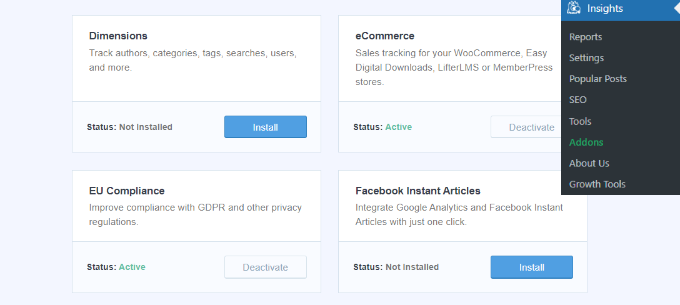
You need to start by visiting the Insights » Addons page. From here, you need to go to the ‘Dimensions’ addon and click on the ‘Install’ button.

Activate the dimensions addon

The addon will now automatically install and activate.

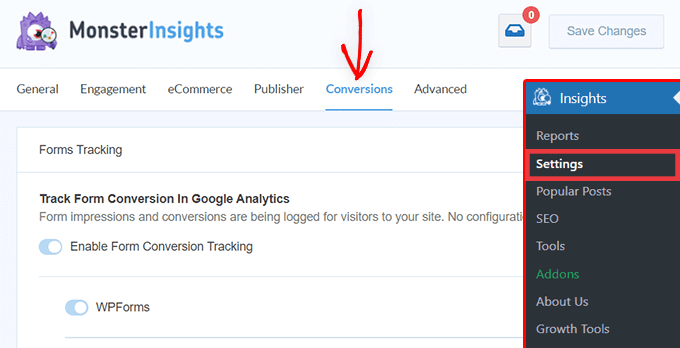
Next, you can go to the Insights » Settings page and switch to the ‘Conversions’ tab.

MonsterInsights settings - conversions tab

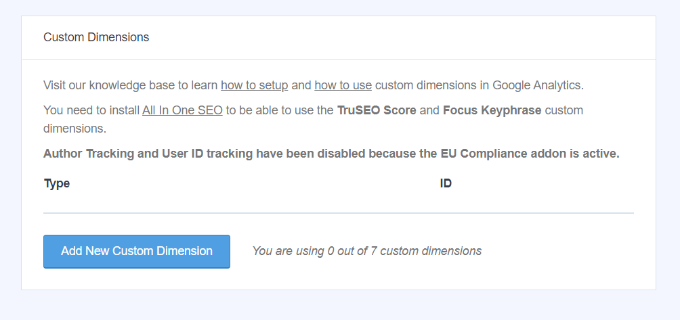
From here, simply scroll down a little, and you’ll see the ‘Custom Dimensions’ box.

This is where you can add a new custom dimension. Go ahead and click on the ‘Add New Custom Dimension’ button.

Add new custom dimension

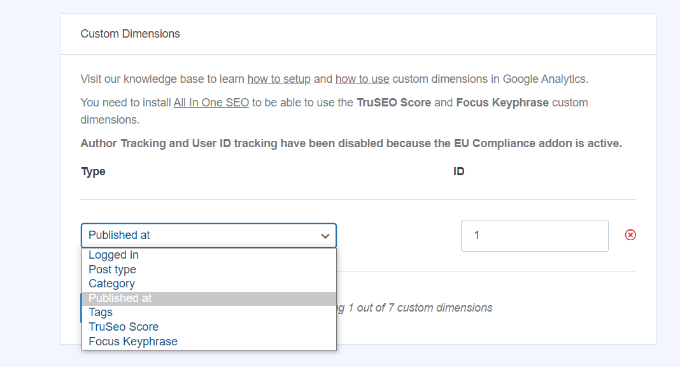
Next, you’ll need to select the ‘Author’ dimension from the drop-down menu.

Besides that, you will also need to add the ID that will be filled in for you.

Select Author in the dropdown menu

Don’t forget to click the to store your settings.

Now that you have set up custom dimensions in MonsterInsights, the next step is to do the same in Google Analytics.

We’ll go through the steps for Universal Analytics and Google Analytics 4.

Add Custom Dimensions in Universal Analytics

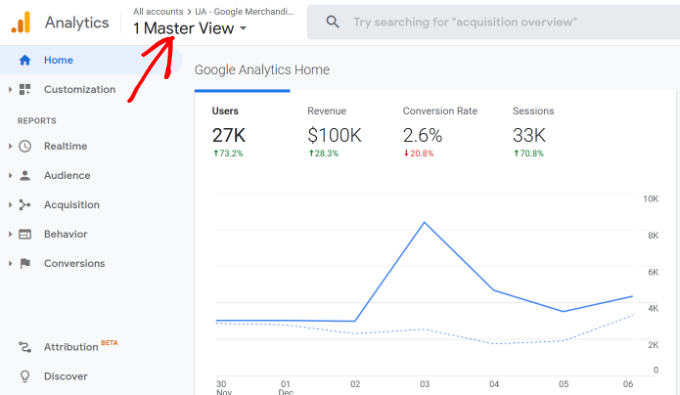
First, you can visit the Google Analytics website and open your website property. Do be sure that the ID for this property begins with ‘UA.’

Choose a website property

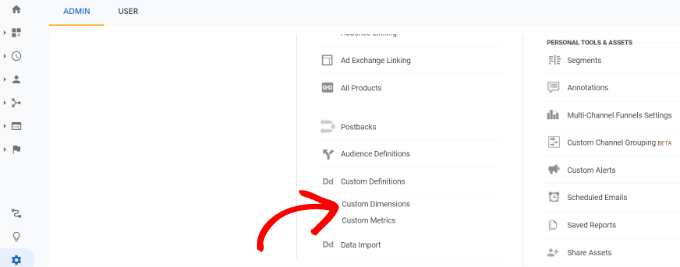
From here, you need to click on the ‘Admin’ button at the bottom left corner of the screen.

Then you can select Custom Definitions » Custom Dimensions under the Property column.

Choose custom dimensions

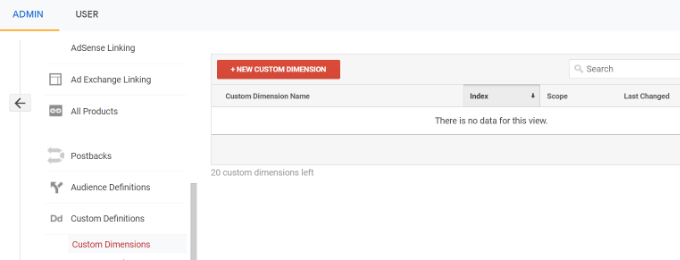
Next, you’ll need to add a new dimension.

Simply click the ‘+ New Custom Dimension’ button.

Click new custom dimension

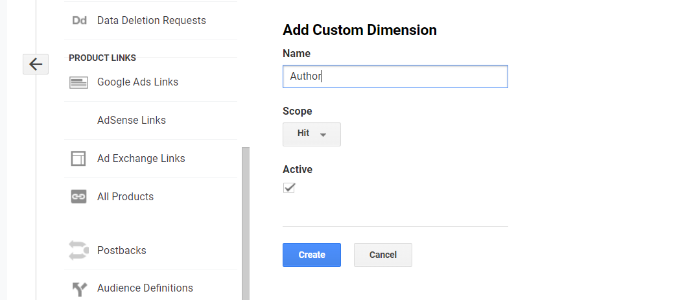
On the next screen, type in ‘Author’ for the name and leave the other details unchanged.

After that, click the ‘Create’ button, and Google Analytics will save it.

Add author to dimension name

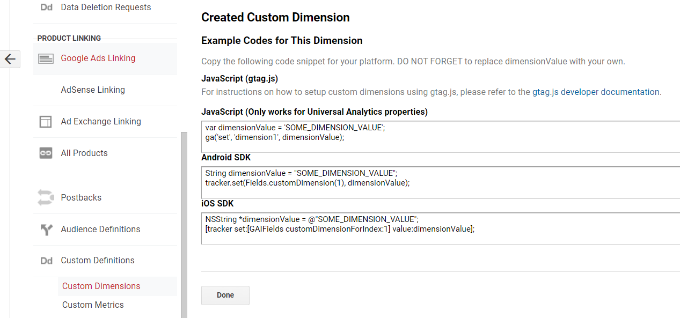
Next, you’ll see some code on the next screen.

You don’t need to do anything, as MonsterInsights handles everything for you. Just click ‘Done’ to continue.

Click the done button

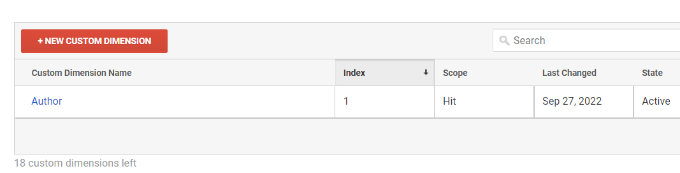
Next, you will see your ‘Author’ custom dimension listed in a table with an ‘Index’ column.

Make sure that the value in the ‘Index’ column is the same as the ID given to that author’s custom dimension in MonsterInsights.

View your author dimension

If not, then don’t worry because you can edit the custom dimension in MonsterInsights.

Now, let’s see how you can set up custom dimensions in GA4.

Add Custom Dimension in Google Analytics 4

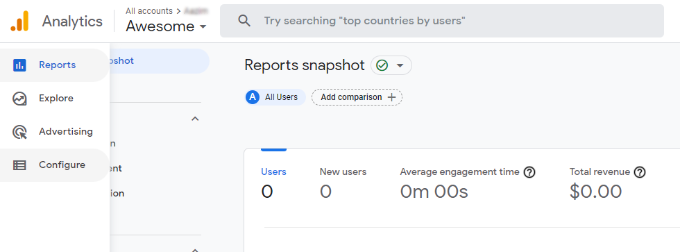
First, you will need to go to your Google Analytics 4 property.

Once logged in, head to the ‘Configure’ tab on the left.

Go to configure

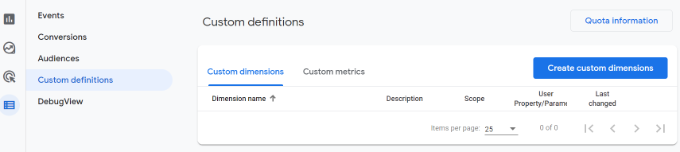
Next, you can click the ‘Custom definitions’ option from the menu that appears.

After that, go ahead and click the ‘Create custom dimensions’ button.

Create a new custom dimension

A window will slide in from the right, where you will need to enter the details of your custom dimensions.

To start, enter a name for your dimension. There is also an option to add a description.

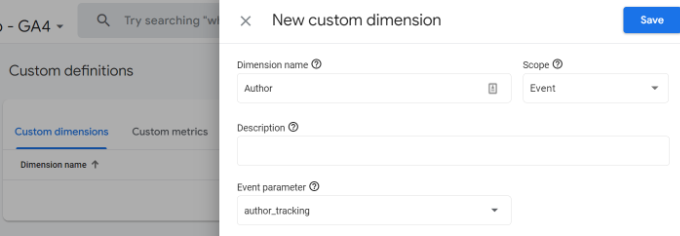
From here, you can keep the Scope set to ‘Event’ and then enter an event parameter like ‘author_tracking.’ The Event parameter is what Google Analytics 4 will use to show your dimension in the reports.

Enter dimension details in ga4

After entering these details, don’t forget to click the ‘Save’ button.

You have successfully set up author tracking on your WordPress website. Now, let’s get to the fun part of viewing the reports and finding out how your authors are doing.

Viewing Your Author Tracking Reports

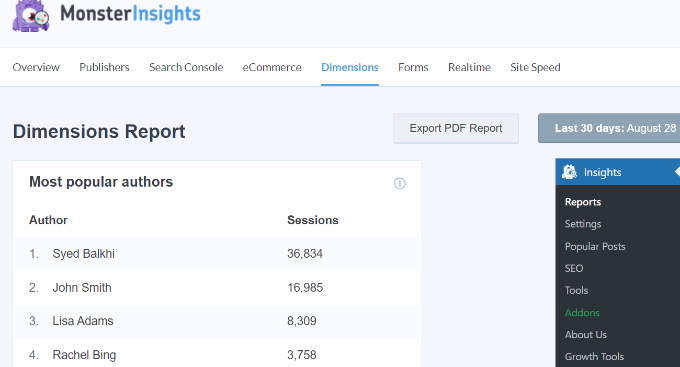
After your website has collected traffic data, you can view your top authors on the WordPress dashboard.

Simply go to the Insights » Reports page and switch to the Dimensions tab.

View most popular author report

From here, you can see the top authors that generate the most traffic on your website.

You can now use this data to improve your editorial workflow and promote content from high-performing authors. For instance, you can display their content as popular posts and get more pageviews.

Additionally, the information will help you see which writers are struggling, so you can work with them and increase traffic to their blog posts.

We hope this article helped you learn how to enable author tracking in WordPress. You may also want to see our guide on how to start an online store and the must-have WordPress plugins.

If you liked this article, then please subscribe to our YouTube Channel for WordPress video tutorials. You can also find us on Twitter and Facebook.

The post How to Enable Author Tracking in WordPress first appeared on WPBeginner.


October 20, 2022 at 11:10PM